
Measurement and privacy
Meta Ad Tracking Not Working? Diagnose the Data Path
If Meta reports fewer sales than your shop admin, the campaign is often fine and the data path is leaking. The leaks come in two kinds, and the difference decides what you are allowed to do about them. Some events are missing because the customer declined tracking, and no tool should recover those. Others are missing for ordinary technical reasons, an ad blocker, an expired browser cookie, a checkout page that stopped running your script, and those you can legitimately fix. Sort your losses into those two piles first. Everything else in this guide follows from which pile you are in.
Reviewed July 31, 2026 against current Meta, Shopify, and WebKit documentation.
Hassan Jamal·July 6, 2026·8 min read
Hassan works on consent-aware measurement integrations and custom commerce systems.
The short answer
- ✓Start with the order or lead system of record and a written event definition.
- ✓Compare like with like: the same event, the same time zone, the same dates, the same test status, refunds handled the same way, and the same attribution window.
- ✓Use Meta diagnostics, browser developer tools, and server logs to find where an event is lost or duplicated.
- ✓If browser and server both send one occurrence, use the same event name and event ID for deduplication.
- ✓Before you price any Conversions API work, check whether Meta will just switch it on for you. Meta-enabled Conversions API launched on April 15, 2026 as a one-click option that mirrors what your Pixel already sends.
- ✓Conversions API is another data path. It is not a consent bypass or a guarantee of recovered attribution.
Conversion measurement
Server-side collection adds another path, not perfect attribution.
Respect consent and verify deduplication before comparing event counts.
Why the browser pixel loses events in the first place
The pixel is a piece of JavaScript running inside someone else's browser, and browsers have spent several years taking away the things it relied on. It still loads, so a quick check looks fine, while a growing share of real customers never reach Meta.
- ✓App Tracking Transparency. Since iOS 14.5 in 2021, Apple asks users whether an app may track them across other companies' apps and websites. When someone declines, the tracking you are permitted to do is restricted. This is a consent outcome, not a bug.
- ✓Third-party cookies are blocked. Safari has blocked cookies for cross-site resources by default since version 13.1, and Firefox does the same. Matching that leaned on those cookies stops working.
- ✓Safari's seven-day storage limit. WebKit deletes a site's script-writable storage, including cookies and local storage written by JavaScript, after seven days of Safari use without the visitor interacting with that site. Someone clicks your ad, comes back two weeks later and buys, and the link back to the click is already gone.
- ✓Ad blockers and consent banners. An ad blocker stops the pixel's request before it leaves the browser. A consent banner holds it until someone clicks accept, and plenty never do. This is why a pixel can fire perfectly in your own incognito test and still miss real buyers.
- ✓Shopify removed checkout.liquid. Shopify's documentation puts two dates on this: checkout.liquid and additional scripts were sunset on the Thank you and Order status pages on August 28, 2025 for all merchants, and script tags were sunset on those pages on August 28, 2025 for Plus stores and are sunset for non-Plus stores on August 26, 2026. Conversion tracking that lived on those pages stops firing.
The pixel is a guest in someone else's browser. A server event is a message you send from your own house. That is the whole reason the second one is more reliable, and also the reason it is not a way around the first item on that list.
That date has passed. Script tags on the Thank you and Order status pages were sunset for non-Plus stores on 26 August 2026, so if any part of your conversion tracking still lived there, it has already stopped rather than being about to. Shopify's documented replacement is Checkout Extensions, and for Meta specifically the native sales-channel integration is the supported path. Check this before you spend a week debugging attribution, because a script that no longer runs will not show up as a Meta problem.
Sort your losses into two piles
This is the step almost every guide skips, and skipping it is how people end up buying tools that promise something no tool is allowed to deliver.
- The customer declined tracking
- No server integration recovers these, by design
- Expect reported conversions to sit below your real order count, permanently
- A vendor promising to close this gap is describing a compliance problem
- +An ad blocker stopped the browser request
- +Safari cleared the browser state before the customer returned
- +A checkout page stopped running your script
- +A permitted event simply never arrived, and a server call would have carried it
Server-side delivery through the Conversions API addresses the right-hand column. It reduces avoidable loss among events you are already permitted to send, because a server call does not depend on the visitor's browser holding onto anything. It does nothing to the left-hand column, and should not.
If Meta reports fewer sales than your shop admin, the campaign is often fine. The data path is what is leaking.
Make sure you are comparing like with like
A storefront normally counts completed orders. A CRM may count qualified leads. Ads Manager applies its own attribution rules to events it can associate with ads. Those are different questions. A mismatch alone does not prove that the Pixel is broken or that one platform has hidden a fixed percentage of sales. If the symptom is rising spend next to a falling order count, the same reconciliation sequence is set out in our guide to auditing tracking when ad spend rises and orders fall.
- ✓Write the business event: for example, a paid order after test and canceled orders are excluded.
- ✓Write down which system you are treating as the truth, the currency, the time zone, the order state, the dates, and when you compared them.
- ✓Export event identifiers where permitted so individual records can be matched, not merely totals.
- ✓Separate delivery from attribution: an event can arrive at Meta without being attributed to an ad.
Reconcile
Compare equivalent records under a documented scope.
Debug
Follow one event from consent to the server log.
Govern
Send only permitted data under current notices, choices, terms, and law.
A browser and server diagnostic sequence
Confirm the dataset identity first and remove stale or duplicate integrations, because everything downstream is unreadable until you know which pixel is firing. Then test the browser event and the server event separately, recording consent state, and verify the required parameters on each. An ad blocker, a consent choice, a navigation race or a duplicate tag can each affect a browser request, and none of them is a universal diagnosis.
- ✓Confirm the expected Pixel or dataset ID and remove stale or duplicate integrations.
- ✓Test with the Meta Pixel Helper Chrome extension for the browser event and the Test Events tool in Events Manager for the server event, alongside the browser network panel. Record consent state and test mode. Meta documents that test_event_code is for testing only and must be removed from the production payload.
- ✓Check the exact event name, when it fired, the value, the currency, which page it came from, and its event ID.
- ✓For server events, confirm the parameters Meta lists as required are present, action_source, event_source_url and client_user_agent, and log request acceptance and rejected parameters without logging prohibited personal data.
- ✓Repeat a controlled test for denial, acceptance, returning visitor, checkout, and any relevant refund or cancellation state.
- ✓Make sure your live tags are not firing from preview, staging, bots, your own staff or automated tests, unless you have deliberately separated those.
An ad blocker, browser policy, consent choice, navigation race, script error, integration update, or duplicate tag can affect a browser request. None is a universal diagnosis. Evidence from the affected session should decide the next step.
← Swipe to see more →
| What happens | Pixel only | Pixel plus server events |
|---|---|---|
| Customer declined tracking | Restricted, correctly | Still restricted. This is not the thing it fixes |
| Ad blocker stops the request | Event never leaves the browser | The server copy still sends |
| Delayed purchase after Safari clears storage | Link back to the click is gone | Server events do not depend on browser storage |
| Checkout page stops running scripts | Tracking silently stops | The order still fires from your system |
| Risk of counting one sale twice | Low, there is only one path | Real, and the reason deduplication below is not optional |
How browser and server event deduplication works
Sending both paths can improve resilience, but two copies of one purchase must not become two purchases. Meta's current documentation describes using matching event names and event IDs so corresponding browser and server events can be deduplicated. Generate one stable ID for the business occurrence, pass it through both paths, and do not reuse it for a different occurrence. For what building and operating both paths involves as a project, see our breakdown of a what a Conversions API setup costs, from the free route upward.
An accepted request does not prove correct attribution, consent, deduplication, value, or downstream reporting. Verify the event in diagnostics and reconcile it against the system of record.
Event Match Quality is a diagnostic, not a guarantee
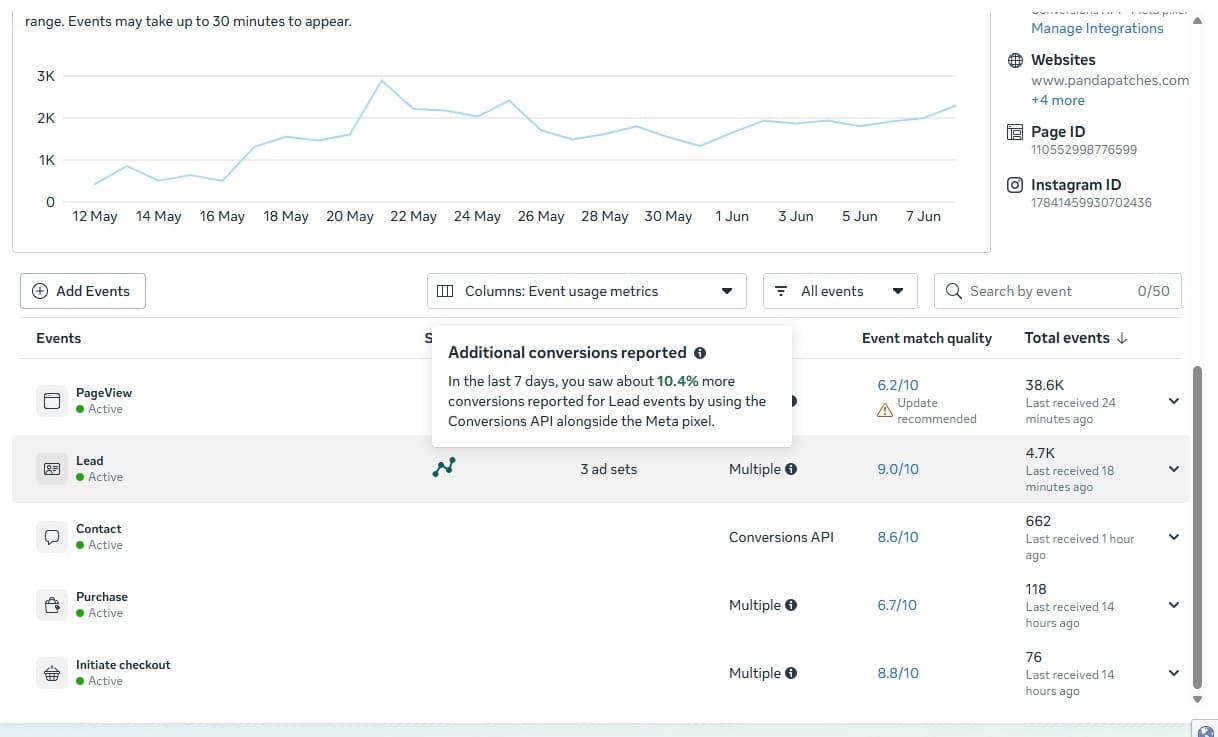
Event Match Quality reflects how customer information parameters may help Meta associate events. It is not a universal minimum score and does not promise lower acquisition cost, recovered revenue, or a particular attribution result. Send only fields that are accurate, permitted, and formatted for the current interface.
For context on what a good score looks like in practice, the screenshot below is from a store we run ourselves rather than a client, which is the only reason we can publish the interface at all.
Conversions API does not remove privacy duties
Meta's Business Tools Terms cover technologies including the Pixel and Conversions API and impose notice, choice, and data-use obligations. The current Data Processing Terms address applicable processing arrangements, but legal roles depend on the product, data flow, jurisdiction, and parties. Hashing an identifier for transmission does not by itself make the collection anonymous or eliminate consent and disclosure requirements. Where the tracking code lives and who controls it belongs to the wider question covered in who owns your website and its code.
- ✓Map each field from collection through browser, server, Meta, storage, access, retention, and deletion.
- ✓Align tag and server behavior with the site's actual consent choices and regional configuration.
- ✓Avoid sending prohibited or unnecessary data in URLs, custom parameters, logs, or event names.
- ✓Keep vendor terms, privacy notices, data-processing terms, and deletion procedures current.
- ✓Get qualified legal advice for the jurisdictions and data involved instead of treating this guide as legal advice.
Shopify and other managed integrations
A native sales-channel integration may manage parts of browser and server delivery, but labels, availability, consent behavior, and supported events change. Use the current Shopify and Meta administration screens and documentation for the installed integration. Verify its data-sharing setting, test events, IDs, values, deduplication, and privacy behavior. Do not assume that installing an app reproduces another store's diagnostics. If you are weighing a managed integration against a storefront you control, compare the two models in Shopify compared with a custom website and in our guide to headless Shopify architecture.
Is there a free route before any of this?
Often, yes, and it is worth ruling in or out before anybody quotes you. Meta announced Meta-enabled Conversions API on April 15, 2026, a one-click option it describes as needing no technical expertise, no costs and no ongoing maintenance, which mirrors the events your Pixel is already sending. It will not fix a Pixel that is firing the wrong event, and it does not give you the control over the event contract that the rest of this page is about. What it does do is close the browser-only gap without a project. Turn it on, remeasure, and only then decide whether you still need to build anything. The four routes and what each one actually costs are set out in what a Conversions API setup costs, cheapest route first.
Why is Shopify's setup simpler than a custom build?
Because the sales channel already knows what a purchase is. On a custom-engineered stack you define the event contract yourself: which server action counts as a conversion, which identifiers you are permitted to send, how the event ID is generated so browser and server copies deduplicate, and where that code runs. Shopify's integration makes those decisions for you for its own standard events. That is genuinely less work, and it is also less control. You inherit whichever events, parameters and consent behavior the integration currently supports, and those change without your involvement.
Why aren't my Shopify sales showing in Meta Ads Manager?
Work through the short answer at the top of this article in order rather than reinstalling anything. Confirm the order exists in Shopify admin. Confirm an event was actually sent for it, using Meta's Test Events tool on a real transaction rather than a preview. Confirm the event was accepted rather than dropped or deduplicated away. Only then look at attribution: the sale may be recorded correctly but assigned outside the reporting window, to a different channel, or to a view-through the model does not credit. A missing sale in Ads Manager is far more often an attribution or consent outcome than a broken integration.
What about tracking after the iOS privacy changes?
Server events do not restore visibility into people who declined tracking, and no integration does. What server-side delivery can improve is the completeness of events you are already permitted to send, because a server call does not depend on the browser holding state. Treat it as reducing avoidable loss rather than recovering opted-out users, and expect reported conversions to stay below your order count in the system of record. Any vendor promising to recover the gap is describing something the consent framework does not allow.
What to demand when someone hands this over
If the person who built it cannot produce this list, you do not own the integration, you are renting an arrangement only they understand. Six artifacts: a dated event dictionary and data-flow map, consent-state test results, redacted request evidence from both paths, deduplication and refund checks, a reconciliation separating delivery from attribution from business records, and named owners for monitoring and incidents.
- ✓A dated event dictionary and data-flow map.
- ✓Consent-state test results for representative regions and journeys.
- ✓Browser and server request evidence with secrets and personal data redacted.
- ✓Deduplication, value, currency, timestamp, refund, and test-traffic checks.
- ✓A reconciliation report that separates delivery, attribution, and business records.
- ✓Named owners for monitoring, vendor changes, incident response, retention, and deletion.
If the person who built it cannot produce that list, you do not own the integration, you are renting an arrangement only they understand. Be equally wary of the report that comes back: any measurement worth acting on carries the date it was taken, what was in scope, and what it cannot tell you. Nobody can honestly promise that a technical change will return a fixed share of your conversions.
We scope this work as part of e-commerce development, the project tiers it sits in are listed on our pricing page, and you can see how we build owned commerce systems in the Panda Patches case study alongside the rest of our client work. To talk through a specific store, get in touch.
Primary sources
- Meta Business Tools Terms
- Meta Data Processing Terms
- Meta Conversions API documentation
- Meta guidance for deduplicating Pixel and server events
- Shopify: checkout.liquid deprecation and its dates
- WebKit: full third-party cookie blocking and the seven-day storage limit
Get your measurement integration plan
We will map the event path, inspect the current integration, and define a consent-aware, testable scope. Any implementation, outcome, and support commitment belongs in the accepted statement of work.
Frequently Asked Questions
Why do Meta and my store show different conversion totals?
They may answer different questions. Reconcile the same event definition, time zone, date range, order state, test and refund treatment, and attribution window. Separate event delivery from ad attribution before calling the integration broken.
Why is my Meta Pixel not firing?
Check consent state, the expected Pixel or dataset ID, duplicate or stale integrations, browser requests, script errors, navigation timing, extensions and vendor diagnostics. Diagnose the affected session instead of assuming one universal cause.
Does Conversions API bypass consent or browser privacy choices?
No. It is a server data path, not a consent bypass. Configure collection and sharing under applicable law, current notices and choices, Meta terms, and your actual data-processing roles. Hashing an identifier does not by itself remove those duties.
How do I prevent duplicate browser and server events?
For one business occurrence, Meta's current documentation describes sending matching event names and event IDs through the browser and server paths. Verify the result in diagnostics and never reuse the occurrence ID for a different event.
What does Event Match Quality prove?
It is a Meta diagnostic about customer information parameters that may help matching. It is not a universal minimum and does not guarantee attribution, lower acquisition cost, conversion lift, or revenue.
Will server-side tracking recover all missing conversions?
No. It may improve event delivery when correctly implemented, but consent, data availability, event quality, deduplication, attribution rules and platform systems still affect reporting. Measure the result under a defined scope.
How should I test a Shopify Meta integration?
Use current Shopify and Meta documentation for the installed sales-channel integration. Verify data-sharing and consent settings, then test event names, IDs, values, currency, deduplication and diagnostics. Do not assume an app install or another store's result proves your setup.
Why are my ads getting clicks but no conversions?
Separate three failures before touching the integration. Delivery: confirm the event actually reached Meta using the Test Events tool in Events Manager, not a preview. Deduplication: Meta discards a duplicate when the browser eventID matches the server event_id and the browser event matches the server event_name on the same dataset within 48 hours, so a mismatched ID can hide a real sale. Mapping: confirm the standard event your campaign optimises for is the same one your site sends. Only then look at attribution, because a sale can be recorded correctly and still fall outside the reporting window or be credited elsewhere. Consent declines also stay uncounted by design.
Related Articles
Meta Conversions API Setup Cost: A Scope-Based Guide
Plan Meta Conversions API cost from events, systems, consent, matching, deduplication, QA and monitoring, with a carefully labelled Panda Patches screenshot.
Spending More on Ads but Getting Fewer Orders? Audit Tracking
Reconcile platform events with the system of record, diagnose browser and server coverage, and improve consented measurement without assuming attribution or performance lift.
WooCommerce Low Conversion Rate: Diagnose It Before You Blame Speed
Speed is the usual suspect because it is the easiest thing to have an opinion about. A diagnostic order that finds the funnel stage which actually changed, including the problems WooCommerce creates that no hosted platform does.