
Measurement architecture
Meta Conversions API Cost Starts With Scope
Nobody can quote Conversions API honestly without knowing your setup. What it costs depends on how many events you send, which systems they come from, how you handle consent, what customer details you are allowed to include, how you stop the same event counting twice, and how much testing it takes before you trust the numbers. Doing it well can get more of your events through to Meta. It does not guarantee more accurate attribution, cheaper campaigns, or extra sales.
Reviewed July 31, 2026 against current Meta documentation and founder-affiliated first-party evidence.
Hassan Jamal·June 14, 2026·18 min read
What a responsible estimate covers
- ✓Which system is the source of truth, and exactly which business events you are sending.
- ✓What you have lawful consent to collect, and which customer details you are allowed to include.
- ✓How a browser event and a server event are recognized as the same event, so nothing counts twice, and what happens when a send fails.
- ✓Testing it with Test Events, checking the live numbers against your own records, and naming who watches it afterwards.
- ✓What your partner, payment gateway, cloud provider and ongoing maintenance cost, not just the hours to build it.
Data map
Source, purpose, fields, consent state, retention, recipients and deletion path.
Delivery
Trigger, validation, event ID, deduplication, retries, errors and monitoring.
Governance
Terms, notices, access, secrets, processors, incident handling and evidence.
What Meta Conversions API does
Conversions API sends supported marketing data from a server, website platform, app, CRM or other business system to Meta. It can complement browser events. Browser delivery can be affected by loading, connectivity, browser controls and implementation failures, but the size of any missing-event gap must be measured against the business's own accepted system of record.
Sending events from your own server does not get you around consent rules. Before you build it, write down why you are collecting each thing, what gives you the right to, what you tell people, what happens when someone opts out, which fields you are allowed to send, how long you keep them, who can see them, and who processes them for you. Get privacy counsel to look at it where that matters. Meta's Business Tools and Data Processing Terms apply on top of all of that.
The short version, before the detail. Your Meta pixel runs in your customer's browser, so it only reports what that browser manages to send. Conversions API is the other half: your own systems report the sale directly to Meta from the record that knows it happened. You normally run both, and you give Meta a shared reference so one sale is not counted twice. What you are buying is not a product with a price on it, it is the work of deciding which events matter, where the truth about each one lives, what you are allowed to send about the customer, and how anyone proves afterwards that it works. That is why the rest of this article talks about scope rather than quoting you a number.
Is the Conversions API free, and what are you actually paying for?
The API itself is free. What costs money is the route you take to it, and there are four. Start at the top of this list and stop at the first one that works for you, because the cheapest route that covers your events is the right answer and most stores never need to go past the second.
- ✓Meta-enabled Conversions API. Meta announced this on April 15, 2026 and describes it as a one-click option requiring “no technical expertise, no costs, no ongoing maintenance”. It mirrors what your Pixel already sends, so it fixes delivery rather than payload. It is free, it takes minutes, and it post-dates most cost articles you will find. Turn it on before you price anything.
- ✓A platform or partner integration. If you are on Shopify, WooCommerce or a similar platform, the native integration is included in what you already pay and is usually a setting rather than a project. Same rule: free first.
- ✓Meta's Conversions API Gateway, or a hosted server-side container. A monthly service fee plus whatever infrastructure it runs on. Worth it when you need to send events the Pixel cannot see, or to control payload across several destinations at once.
- ✓A custom server-side build. This is the only route with real engineering in it, and the only one where a four-figure number is honest. You are paying for event mapping, identifier handling, consent, deduplication, retries, logging and the tests that prove it works.
The reason published ranges disagree so violently is that they average those four routes into one number. A $0 toggle and a bespoke integration are both truthfully called “setting up the Conversions API”. Establish which route you need before you accept any figure, including ours, and re-run your reconciliation after the free options are on. If the gap closes, you are finished and you have spent nothing.
"Nobody can quote the Conversions API honestly without knowing your setup first.
Why cost ranges without scope are misleading
We do not publish a market price range for a Conversions API build, and we would treat one you find elsewhere with caution. Published ranges disagree so violently because they average unlike routes into one number. Five variables move the real figure, and the first is the one most quotes never establish: how many events, across how many systems, with what data quality already in place.
- ✓One lead form and one thank-you event is not equivalent to catalog, checkout, refunds, subscriptions and offline sales.
- ✓A native platform or partner integration is different from a direct custom integration across several systems.
- ✓Existing consent, identity, CRM and order data quality can reduce or increase implementation work.
- ✓Historical backfill, offline events, multiple pixels, markets, domains and business units add design and test cases.
- ✓Monitoring, vendor changes, incident response and future event changes create ongoing ownership work.
We do not publish a market price range for a Conversions API build, and we would treat one you find elsewhere with caution. What the work costs depends on how many events you need, whether your checkout is hosted, which systems hold the source of truth, how consent is handled and who maintains it afterwards. A range quoted without those specifics is describing a different project from yours. Price the system in front of you using the drivers below, and ask any vendor to do the same rather than quoting from a table.
A practical discovery worksheet
Acceptance, cure, support and change-control terms get written before a price is attached, not after. Six things fill in first: each event with its trigger and authoritative record, the shared event ID used for deduplication, every customer parameter mapped to source and permission, the delivery route with its recurring charges named, and the reconciliation tolerance you will accept. A quote produced without these is pricing a different project.
- ✓List each event, its trigger and its authoritative record, including cancellation, refund and test-event rules.
- ✓Record the browser event name, server event name and shared event ID used for deduplication.
- ✓Map every customer-information parameter to its source, normalization, permission and transmission rule.
- ✓Choose direct, partner or gateway delivery and name every processor, account owner and recurring charge.
- ✓Define Test Events evidence, production reconciliation tolerance, alerting, logs and retry limits.
- ✓Write acceptance, cure, support and change-control terms before attaching a price.
Deduplication must be tested, not promised
When browser and server channels send the same logical event, Meta documents deduplication using matching event identity. The implementation should create that identity at the appropriate business action, reuse it across both channels and verify behavior in Meta's tools. Duplicate suppression, retries and delayed events require explicit tests. “Never double-counts” is not a responsible guarantee.
- ✓Generate the event ID at the business action, not in the browser and again on the server, so both channels can carry the same value.
- ✓Send the same event name on both channels. Meta matches on event name plus event ID, so a browser Purchase and a server purchase_completed will not deduplicate.
- ✓Store the event ID against the order or lead record. A retry hours later must reuse the original ID, not mint a new one.
- ✓Test the awkward paths explicitly: a refund, a canceled order, a duplicate form submission, a delayed webhook and a manually created order.
How the integration is actually put together
The engineering is not exotic, but every step is a decision that has to be written down before it can be priced. This is the sequence we work through on a build.
- ✓Capture ad click identifiers on landing. Meta's fbclid arrives on the URL and becomes the _fbc cookie; _fbp is the browser cookie Meta's own script sets. Persist both against the visitor so a purchase three days later can still carry them.
- ✓Pick the system of record for each event. A paid order should be reported by whatever system knows the payment succeeded, usually the order database or the payment webhook, not a thank-you page that may never load.
- ✓Fire the server event from that system, with the event ID, event time, action source and the customer-information parameters the consent state permits.
- ✓Normalize and hash the match keys before sending. Meta requires SHA-256 hashing for email, phone, name, city and similar fields, with trimming and lower-casing applied first. Get the normalization wrong and the hash will simply never match.
- ✓Handle the hosted-checkout handoff deliberately. Stripe, Square, Calendly and CRM-hosted forms move the buyer off your domain, which is exactly where a browser-only pixel loses sight of the conversion. A server event from the payment record covers that hop.
- ✓Decide what happens to offline, phone and manually created orders. They can be sent, but they arrive without _fbc, _fbp or UTM values, so plan for weaker matching rather than pretending it is equivalent.
- ✓Wire up retries, dead-letter logging and an alert for a drop in accepted events, then name the person who owns that alert.
None of this recovers a user who opted out, and none of it repairs an attribution gap on its own. It changes how the events you are permitted to send get delivered and matched, which is a measurement change, not a demand-generation one.
Match keys are what move Event Match Quality
Event Match Quality reflects how much usable customer information travels with an event. One hashed email is thin. Email plus _fbp, IP and user agent is better. Email plus _fbc, _fbp, IP, user agent and campaign parameters is better again. That single mechanism explains most of the variation you will see between events on the same account.
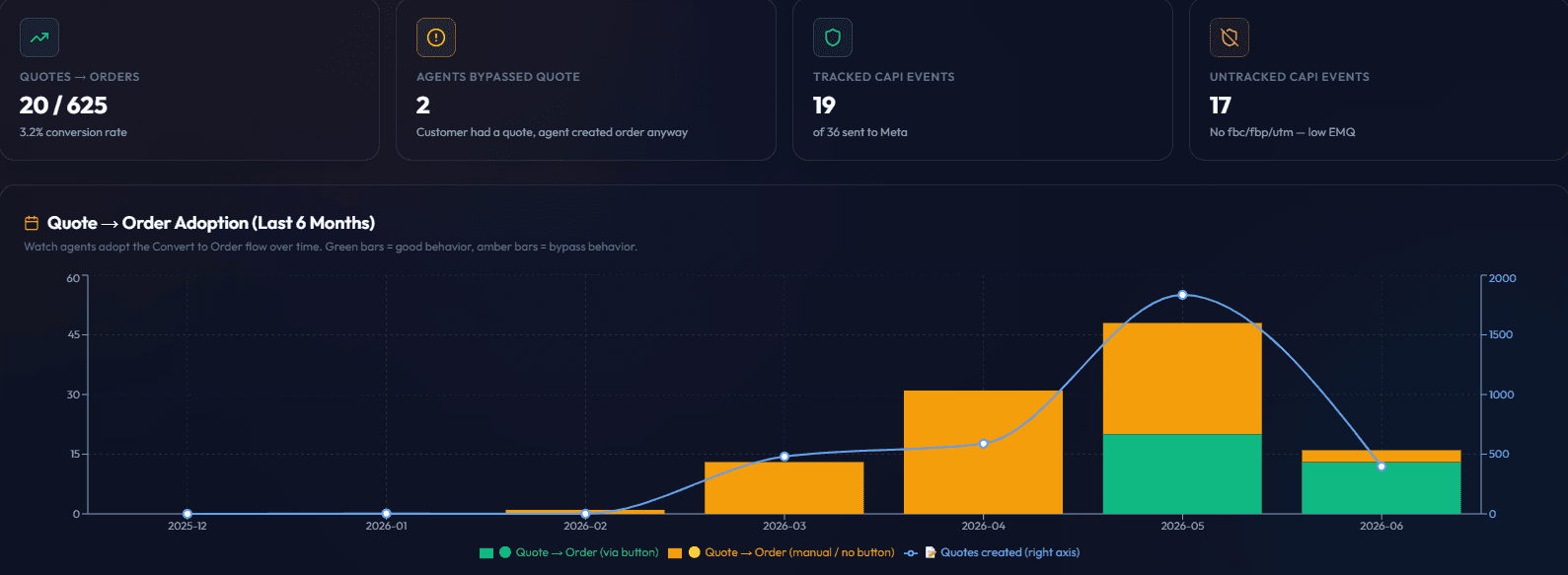
We previously illustrated this with a screenshot of our own order-level monitoring view. It has been removed because the customer column was not adequately redacted, and no marketing point is worth publishing customer names. The pattern it showed is simple enough to state: orders carrying only an email address estimate lower than orders carrying an email plus _fbc, _fbp, IP address, user agent and UTM values. More signals present at the moment of the event, higher the match quality. You can observe the same thing in your own data without anyone else seeing it.
What the Panda Patches screenshot shows
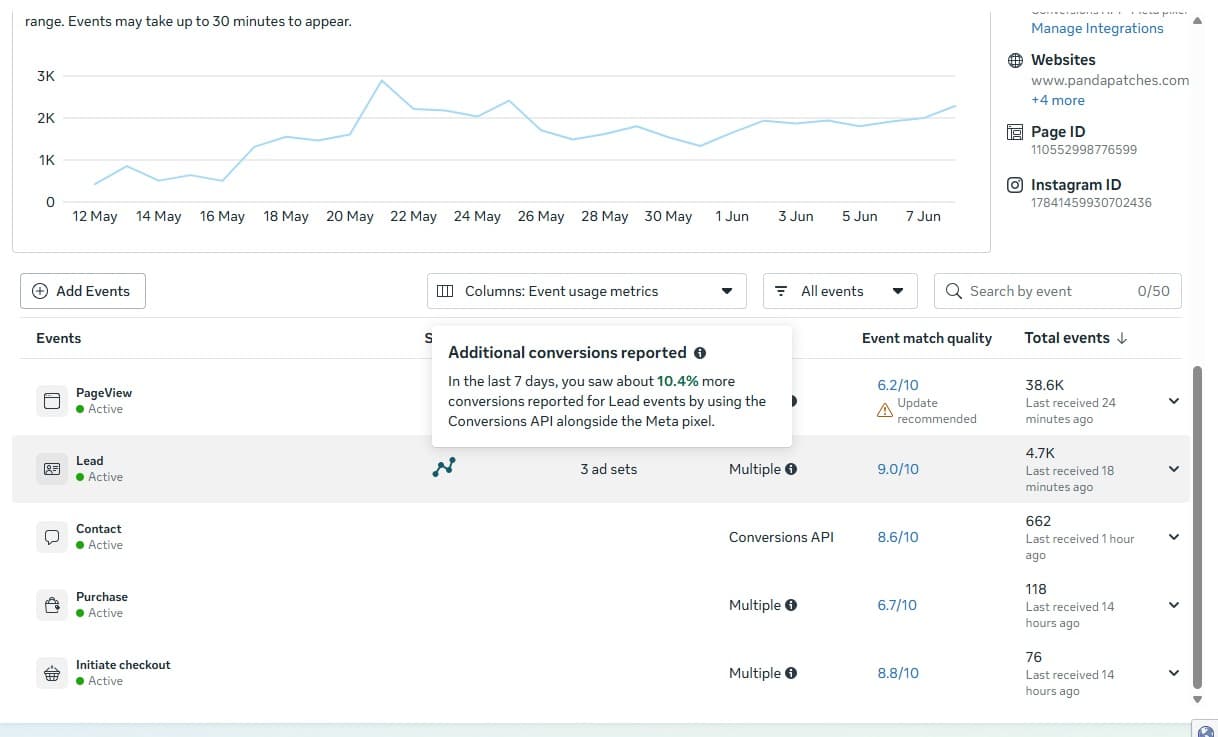
The same view shows Event Match Quality per event on that account: Lead 9.0/10, Initiate checkout 8.8, Contact 8.6, Purchase 6.7 and PageView 6.2. The spread is instructive rather than impressive. Lead events carry a form submission with identifiable fields. PageView is anonymous traffic with almost nothing to match against, so it caps low on any account and chasing that number is wasted effort. Purchase sits lower here because the account sends offline and manually created orders that arrive without click identifiers.
Event Match Quality tells you one thing: how much customer detail you managed to send Meta for matching. A good score does not prove you have consent, that your own records are right, that events are not being counted twice, that attribution is correct, or that your campaigns are working any better. Check the events Meta accepted against your own system of record, and keep a note of the date, the filters you used, and what was live at the time.
Diagnose before you buy
Run this sequence before accepting any quote. It usually takes an afternoon and it either justifies the project or saves you the money.
- ✓Count the real conversions in your own system of record for a fixed period, by date and market. That number is the denominator for everything else.
- ✓Compare it against what Events Manager reports for the same period and the same event, with the same attribution window and filters.
- ✓Open the Diagnostics tab and read the actual warnings. Missing parameters, unhashed data, invalid event times and redundant purchase events are common and are usually implementation faults rather than a reason to buy anything.
- ✓Segment the gap by path. Orders that completed on your own domain, orders that completed on a hosted checkout, and orders created by staff by phone or in person behave very differently.
- ✓Check whether the events you are losing arrive with any click identifier at all. If they do not, server delivery will send them but will match them weakly.
- ✓Only then decide what to build, and write the observed numbers into the scope so acceptance can be tested against them.
Direct, partner and gateway approaches
Each route trades a different thing away. “No middleware subscription” is not the same as zero ongoing cost or no third party, because a direct integration still depends on Meta and on your own hosting, databases or queues. A native or partner integration reduces custom work and brings its own supported-event set and recurring charges. A gateway centralizes delivery and adds infrastructure you now operate.
- ✓A native or partner integration may reduce custom work but introduces its own supported-event set, terms, data path and recurring charges.
- ✓A gateway can centralize delivery while adding infrastructure, configuration and processor responsibilities.
- ✓A direct integration offers implementation control but still uses Meta and hosting services and requires maintenance, monitoring and secure credential handling.
“No middleware subscription” is not the same as zero ongoing cost or no third party. The application still depends on Meta and its hosting, databases or queues. Compare current vendor terms, commercial-use permissions, included usage and support before accepting an option.
Which of the four paths is actually enough for you
There are four routes to a working Conversions API, and most published comparisons rank them by price. Price is the wrong sort order, because three of the four are cheap and the question that matters is which one still works for your setup. Ranked instead by what they can carry:
- ✓Meta's own one-click setup or a commerce partner integration, in Events Manager. Free, no infrastructure, and genuinely the right answer for a standard Shopify, WooCommerce, Wix or BigCommerce store sending standard events. If this covers you, stop here. Anything else is money spent on capability you will not use.
- ✓A hosted CAPI gateway, such as Stape. You deploy Meta's packaged container on someone else's infrastructure for a monthly fee that scales with pixels or event volume. Reasonable when you want server-side delivery without operating a server, and when your events are still close to standard.
- ✓Server-side Google Tag Manager, on your own cloud instance. Worth it mainly when you are already running server-side GTM for other destinations, because then Meta is one more tag rather than a new system. On its own, for Meta only, you are renting and maintaining infrastructure to solve a problem the free path may already solve.
- ✓A direct integration written against your own system of record. The only route that fits when the conversion is not a standard ecommerce event, when the value is calculated after the fact, when refunds and cancellations must flow back, or when the event lives in a CRM or ERP rather than a checkout.
The order above is also the order to try them in. The most common expensive mistake on this is not choosing the wrong vendor, it is buying a custom integration for a store whose events the free partner integration already supports. Before commissioning any work, open Events Manager and check whether your platform is on Meta's supported partner list and whether the events you care about are in its standard set. That check costs nothing and rules out the most expensive option first.
This also explains why our own number sits above the figure usually quoted for “a developer to set up CAPI”. A cheap integration ends when events start arriving. The scope below ends when deduplication has been tested against real traffic, match keys have been validated through Event Match Quality, consent behaviour has been proven, and acceptance evidence exists. Those are different deliverables, and the gap between them is where most of the disappointing CAPI projects live.
What actually moves the price
A Conversions API integration sits in our Scale tier at $5,000; our Starter and Growth tiers, at $1,500 and $3,500, do not include one. What moves a quote within Scale is scope rather than the platform. We will not print a market range we cannot stand behind. What we can give you is the set of variables that decide whether a build sits at the bottom or the top of whatever quote you are given, so you can push a vendor on the ones that apply to you.
| Cost driver | Cheaper end | Expensive end |
|---|---|---|
| Event set | One lead event and one confirmation | Catalog, checkout, subscriptions, refunds, offline sales |
| Source systems | One platform that already holds the order | CRM, ERP, payment processor and site all in the path |
| Consent model | One market, one banner, one lawful basis | Multiple regions, per-purpose consent, suppression rules |
| Identity data | Clean, normalized email and phone already stored | Sparse, unvalidated or duplicated customer records |
| Deduplication | Browser and server both built by the same team | An existing pixel or tag manager setup nobody owns |
| Accounts and domains | One pixel, one domain, one business unit | Several pixels, markets, brands or subdomains |
| Backfill and offline | None required | Historical import plus ongoing offline event uploads |
| Ongoing ownership | Client takes the alerts after handover | Monitored, reconciled and maintained under a retainer |
Who needs this, and who does not
Plenty of sites are sold a Conversions API build they have no use for yet. The honest line runs roughly here.
It is worth scoping if you spend meaningfully on Meta ads every month, you take leads or payments online, and your conversion completes somewhere a browser script cannot reliably reach: a hosted checkout, a booking tool, a CRM-hosted form, a phone call, or an order your staff key in later.
You do not need this yet if you are not running paid Meta ads, if your spend is small enough that better-delivered events will not change a single budget decision you make, or if you have not yet fixed the plainer problems first. A broken pixel, an event that fires on the wrong element, a missing consent banner or a checkout nobody has tested will each distort your numbers more than browser loss does, and all of them are cheaper to fix. Reconcile against your own records first. If the gap is small, spend the money on the offer instead.
How PandaCodeGen scopes the work
Conversions API can be included in an accepted Scale project starting at $5,000 when the signed scope names the required events, systems and acceptance tests. It is not automatically included in every project, and complex commerce, CRM, offline-event or multi-market requirements can change the price. The public tier is a starting point, not a quote.
For clarity on where it sits in the tiers: Starter from $1,500 and Growth from $3,500 do not include a Conversions API integration. Scale runs $5,000, and an accepted scope at that tier is where the integration belongs. At the upper end of Scale we can add event-quality and reconciliation monitoring you can read yourself, and fold ongoing measurement work into a retainer. See the pricing page for the full breakdown.
- ✓30% is due at onboarding and 70% at delivery under the accepted project terms.
- ✓The client controls its business accounts and credentials when the agreed account model provides that access.
- ✓Reusable internal tools and pre-existing code remain PandaCodeGen property; project deliverables and third-party licenses follow the signed terms.
- ✓Support scope and duration follow the selected package and accepted agreement.
Questions to put to any vendor
Ask these before signing, whoever you hire. A vendor who cannot answer them in writing is quoting a guess.
- ✓Which exact events will you send, from which system, and what is the authoritative record for each one?
- ✓Who holds the access token and the pixel or dataset, and does it stay in our business account if we part ways?
- ✓Does any third party sit in the data path, and if so, under whose contract and at what recurring cost?
- ✓How is deduplication implemented, and what test will you show us that proves it works for refunds, retries and delayed events?
- ✓What happens to events when a user withholds or withdraws consent, and how is that tested per region?
- ✓What is the written acceptance test, what is the cure period if it fails, and what is included in support afterwards?
- ✓What are we expected to maintain after handover, and what will alert us when events stop arriving?
Acceptance evidence
Never double-counts is not a responsible guarantee, so acceptance is demonstrated rather than asserted. Six artifacts do it: a signed event matrix matching what was deployed, consent and suppression tested per region, browser and server examples visible in Test Events, production events reconciling to the source of truth within a written tolerance, duplicate and refund behavior shown working, and the secrets, monitoring and change ownership handed over.
- ✓A signed event matrix and data-flow diagram match the deployed implementation.
- ✓Consent and suppression states are tested for each applicable region or user state.
- ✓Browser and server examples appear in Test Events with expected fields and shared identity where required.
- ✓Accepted production events reconcile to the system of record within a written tolerance and period.
- ✓Duplicate, retry, failure, refund and test-record behavior is demonstrated.
- ✓Secrets, access, monitoring, runbooks and change ownership are handed over as agreed.
Primary sources
- Meta developer documentation: Conversions API
- Meta developer documentation: deduplicate Pixel and server events
- Meta Business Tools Terms
- Meta Data Processing Terms
Scope your tracking setup
Bring your event list, platform, CRM or order system and current Meta diagnostics. We will identify the smallest responsible implementation and put the data path, acceptance and operating responsibilities into the scope.
Frequently asked questions
Frequently Asked Questions
How much does Meta Conversions API setup cost in 2026?
There is no responsible universal price. Quote the exact event set, source systems, consent requirements, matching data, browser and server deduplication, testing, reconciliation, monitoring, processors and support. PandaCodeGen can include an accepted CAPI scope in a Scale project starting at $5,000, but that starting tier is not a quote for every implementation.
Is the Meta pixel enough on its own?
It depends on the accepted measurement requirements and observed event coverage. Meta documents using Conversions API alongside the pixel for a more reliable connection, but the actual gap must be reconciled against the site's system of record. Server delivery does not bypass consent, privacy obligations or Meta's terms.
What is the difference between a managed tool and a direct setup?
A native, partner or gateway option may reduce custom work but adds its supported-event limits, terms, data path and possible recurring charges. A direct integration offers more implementation control but still depends on Meta and infrastructure and requires secure credentials, testing, monitoring and maintenance. Compare current vendor terms and the complete operating model.
Will server-side tracking actually improve my ad performance?
Meta recommends using Conversions API with the pixel for a more reliable connection, subject to consent and Meta's current terms. Measure event coverage, match-key quality, deduplication, and reconciliation against the system of record. A dated Panda Patches screenshot is a first-party platform-reporting example, not a controlled lift study, benchmark, or guarantee.
Do I need the Conversions API if I am not on Shopify?
The decision is platform-independent. Start with the accepted events and system of record, then measure browser delivery and determine whether a supported server source can improve reliability. There is no universal traffic, spend or revenue threshold.
Is Conversions API included in a PandaCodeGen build?
It can be included in an accepted Scale project starting at $5,000 when the signed scope names the required events, systems, consent behavior and acceptance evidence. It is not automatically included in every build, and complex requirements can change the price.
Related reading
For how to audit where conversion signal is being lost before you buy anything, read spending more on ads but getting fewer orders. For the wider Meta tracking picture in 2026, see fixing Meta ad tracking. For the recurring software bill that funds work like this, see the real Shopify app cost breakdown.
Related Articles
Meta Ad Tracking Not Working? A 2026 Diagnostic Guide
A consent-aware method for reconciling orders and Meta events, debugging browser and server delivery, and preventing duplicate events.
Spending More on Ads but Getting Fewer Orders? Audit Tracking
Reconcile platform events with the system of record, diagnose browser and server coverage, and improve consented measurement without assuming attribution or performance lift.
AI-Built Website Checklist: 8 Checks Before Launch and After Changes
Check enquiries, payments, mobile use and search access on your AI-built website. Eight practical checks, evidence to save and when to repeat them.