The Short Answer
- Chrome documents Agentic Browsing as an experimental Lighthouse category based on proposed standards.
- It reports a pass ratio and individual results for WebMCP, agent-relevant accessibility, layout stability, and discoverability through llms.txt and, since September 2026, ai-catalog.json.
- Chrome's current documentation requires Chrome 150 or later; WebMCP audits also require the WebMCP origin trial.
- A June 20, 2026 PandaCodeGen screenshot recorded 3/3 under Lighthouse 13.4.0 and HeadlessChromium 146.0.7680.177. That is a historical snapshot, not a current universal result.
- A separate Panda Patches dashboard recorded $7,419.18 across 27 internally AI-tagged orders. The owner-approved screenshot is first-party, not independently audited, and does not connect those orders to this Lighthouse result.
Agentic browsing describes software navigating or acting on a website for a user. The Lighthouse category is a developer diagnostic for selected machine-interaction conditions. It is not a Google Search ranking signal, a certification across agents, or evidence that an agent completed a business task. Use it alongside browser-specific task tests, accessibility checks, security review, and real outcome measurement.
About PandaCodeGen
Our migrations can include recorded checks on what actually renders, whether the HTML is semantic, whether controls have accessible names, whether the layout holds still, and the Lighthouse profiles you agreed. Experimental results are dated with their browser and tool versions and do not create a ranking, citation, transaction, or revenue promise. The sites PandaCodeGen builds to pass these checks start at $1,500 at a fixed price, with no minimum project size, and you own the code.
What Is Agentic Browsing?
Quick Answer
Agentic Browsing is an experimental Lighthouse category for deterministic machine-interaction checks. It reports a fraction and individual pass, warning, or error results rather than a weighted score. Chrome explicitly says the standards are still emerging, so record the date, page state, browser, and Lighthouse version.
It is useful as an engineering signal. If controls have proper names, relationships are valid, the layout holds still and tools are declared, software has less to guess at. The official documentation does not call it a search ranking factor and does not forecast adoption or commerce volume. Business investment should follow a named user journey and measurable demand, not a market projection alone.
What Google Actually Scores Today
Quick Answer
Chrome groups the current audits under WebMCP integration, agent-centric accessibility, stability, and discoverability. The category may report accessibility checks, CLS, llms.txt presence, and registered WebMCP tool conditions. Read the individual audit output; neither a framework nor a platform determines the result automatically.
The accessibility tree is one machine-readable view of interactive content. OpenAI also says its Atlas agent uses ARIA labels and roles to interpret structure and controls. Correct semantic HTML and accessible names therefore help people and supported agents, but do not guarantee that every agent uses the same model or that search systems quote the page.
There is a point buried in that worth saying plainly. An agent reads your page through much the same structure a screen reader uses for a blind visitor: the headings, the roles, the accessible names on your controls, the labels on your form fields. Semantic markup used to be filed under accessibility, and treated by plenty of teams as a compliance chore. It is now also the interface a machine reads your page through. That is the honest reason these checks exist, and it is why the work overlaps so heavily with things you should have been doing anyway.
It also helps to keep two different questions apart. The first is whether an agent can read and navigate your page. That is what the accessibility, layout-stability and discoverability audits look at, and those run today. The second is whether an agent can reliably act on it, submit the form, complete the purchase, change the booking. That is what WebMCP is for, and it is the part that is not settled. Almost all the confusion about this category comes from treating those two as one question.
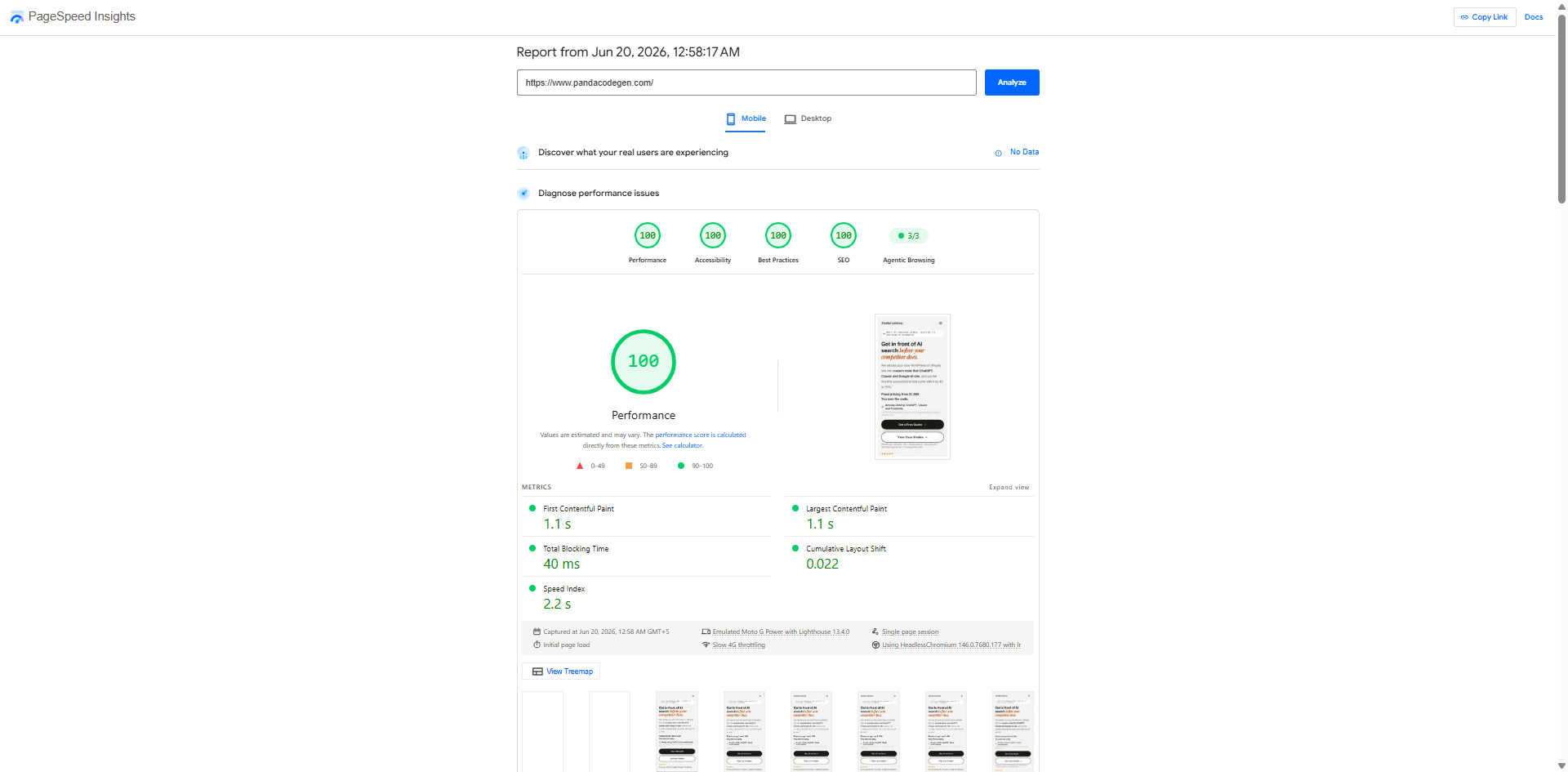
A dated audit result proves only what that tool checked on that page, under that recorded environment. It certifies nothing about your other pages, other browsers, other agents, other tasks, or the next version.
Does Being AI-Readable Actually Lead to Sales?
Quick Answer
No Lighthouse result proves an AI recommendation or a sale. The owner-operated Panda Patches store separately recorded $7,419.18 across 27 internally AI-tagged orders in a June 2026 dashboard snapshot. Those labels are first-party attribution, not an independently audited or causal measurement.
The screenshot records 25 ChatGPT-tagged orders totaling $5,149.18, one Perplexity-tagged order totaling $590, and one Claude-tagged order totaling $1,680. PandaCodeGen's owners approved publication because Panda Patches is their own brand. The image does not show the collection method, attribution window, returns, taxes, or counterfactual orders, so it is presented as an internal snapshot rather than proof of channel incrementality.
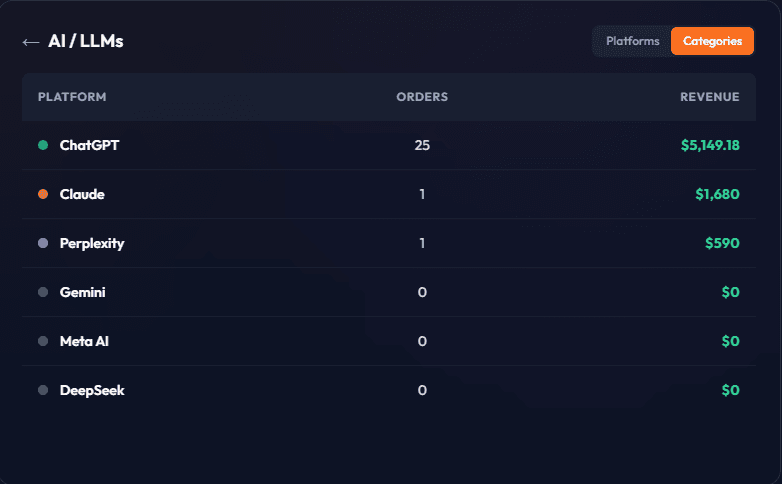
The two screenshots answer different questions and should not be joined into one success claim. The Lighthouse image records a technical audit on pandacodegen.com. The commerce image records internal referral labels on Panda Patches. Neither demonstrates autonomous agent purchasing, and the second does not show that the first caused revenue.
Use the Lighthouse category to find specific technical issues. Measure referrals and completed tasks separately, with a documented attribution method. Do not use one as proof of the other.
What Is WebMCP, and Why Is It “Not Applicable”?
Quick Answer
WebMCP is a proposed browser API for exposing site tools to agents. Chrome's current Agentic Browsing documentation says the category requires Chrome 150 or later and WebMCP audits require registration for the WebMCP origin trial. A Not Applicable result must be interpreted from that run's audit detail, not assigned one universal cause.
It is useful to separate interpreting the interface from calling an explicitly registered tool. Accessibility-tree quality and layout stability can help the first. WebMCP experiments address the second. Neither alone proves that a specific agent can safely complete a form, purchase, or account action; those journeys also need authentication, authorization, validation, confirmation, error, privacy, and abuse testing.
Before you ship this, say which browser or agent you support, which journey it covers, what the origin trial requires, what data is exposed, who reviewed the security, what happens when it fails, who maintains it, and what acceptance test it has to pass.
For most sites, though, the practical answer is to wait, and the requirement itself is the reason. Those audits only run on Chrome 150 or later and only for origins registered in the WebMCP origin trial. A capability gated behind an origin trial is a capability that is still being changed, and building production integration against it means committing engineering time to a moving specification that almost nothing consumes yet. That is a real cost with a speculative return. Prototype it if you have a specific journey and a specific agent in mind. Otherwise the browsability layer is where the same effort pays off today, for people as well as for software.
The Honest Truth About llms.txt
Quick Answer
An llms.txt file is a voluntary discovery document, not a Google Search requirement or a guaranteed AI input. Product behavior is mutable and should be checked against each provider's current primary documentation and observed requests. Keep the file concise and factual, and do not assign it ranking, citation, or scoring value without evidence.
Chrome's experimental audit checks llms.txt presence, but that check does not make the file a Google Search requirement or prove that another product consumes it. Add and maintain the file only when it serves a named consumer or test. Crawlable, useful, source-linked content remains important, but no structure or opening-sentence pattern guarantees retrieval or quotation.
How do you check your own score, and your competitor's?
Quick Answer
Open pagespeed.web.dev, enter your URL, choose Mobile, and read the Agentic Browsing figure next to Performance. Then do the same for the two or three competitors you lose work to. It takes about a minute each and needs no account, no tool and no access to their site.
Run it on the page you would want an assistant to describe, which is usually a service or product page rather than the home page. The audits run per URL, so a good home page score tells you nothing about the page that actually sells.
Then run the same test on a competitor. This is the part most people skip and it is the only part that gives the number meaning. A 1 of 3 in a field where everyone scores 1 of 3 is a different situation from a 1 of 3 where two rivals score 3 of 3. You are looking for a gap, not a grade.
What the comparison can tell you is narrow and worth stating plainly. It shows whether an assistant reading your page finds a well-formed structure, a stable layout and a machine-readable summary, and whether your competitor's page does. It does not tell you who gets recommended, how often either page is quoted, or what any of it is worth. Those are separate questions and this score answers none of them.
Why fix this one before the performance score?
Because it is the only score on the report where a competitor can be measurably ahead of you on something you can close in weeks. Performance is a spectrum and everyone argues about it. Agentic Browsing is close to binary: you pass a check or you do not, the same three checks apply to your rival, and the category is new enough that most of any given field has not looked at it yet.
| Site | Score | What failed |
|---|---|---|
| Divi site | 0 of 3 | accessibility tree, layout shift, llms.txt |
| Divi site | 0 of 2 | accessibility tree, layout shift |
| Elementor site | 1 of 3 | accessibility tree, layout shift |
| Elementor site | 2 of 3 | accessibility tree |
| WordPress site | 1 of 2 | accessibility tree |
| WordPress site | 1 of 2 | accessibility tree |
| Squarespace, own marketing site | 2 of 3 | accessibility tree |
| Webflow, own marketing site | 3 of 3 | nothing |
| pandacodegen.com | 3 of 3 | nothing |
Eight of the nine failed the accessibility-tree check, including Squarespace's own marketing site. That is the finding worth carrying away: the common failure is not a missing AI file, it is that the page's structure is not legible to something that is not a browser. It is also the check nobody can pass by adding a file, which is why it is the one that separates sites.
What a 0 of 3 does not mean. It does not mean assistants cannot see your site, that you are absent from AI answers, or that you are losing customers. None of those are measured here. It means three specific checks failed on one URL. Anyone telling you a low score makes your business invisible is selling from a number that does not say that, and the honest version is strong enough without it: your competitor passes checks you fail, on a report you can both run in a minute.Which three checks make up the score?
Seven audits now sit in the category, and most sites are scored on three of them. Lighthouse 13.5.0, released September 18, 2026, added a seventh that checks an ai-catalog.json file. We confirmed the count against the PageSpeed Insights API on 29 August and again on 8 October 2026, not from other write-ups, several of which disagree about whether the denominator is three or four. It isn't fixed: the three WebMCP audits and the new ai-catalog.json audit report “not applicable” on any site that hasn't set them up, which today is nearly every site, so those drop out of the count and the remaining three are what you are scored on.
| Audit | Counts for most sites | What it looks at |
|---|---|---|
agent-accessibility-tree | Yes | Whether the accessibility tree is well-formed: names, labels, structure |
cumulative-layout-shift | Yes | Whether the layout stays still while it loads |
llms-txt | Yes | Whether an llms.txt file exists and follows the recommendations |
webmcp-form-coverage | No | Not applicable without WebMCP |
webmcp-registered-tools | No | Not applicable without WebMCP |
webmcp-schema-validity | No | Not applicable without WebMCP |
ard-schema | No | Whether an ai-catalog.json file is valid. Not applicable if you don't publish one (added in Lighthouse 13.5.0) |
This is why two sites can show different denominators and neither is broken. Implement WebMCP or publish an ai-catalog.json file and the count grows; skip both, as almost everyone has, and you are scored out of three.
What does “well-formed” actually mean?
It means no violation of thirty-three named rules. We read the audit's source rather than anyone's description of it: core/audits/agentic/agent-accessibility-tree.js on the Lighthouse main branch, checked 4 September 2026. The audit takes the axe-core violations already collected for the accessibility category and filters them to a hard-coded list.
The list runs from button-name, link-name and labelthrough the ARIA family, aria-required-attr, aria-valid-attr-value,aria-required-children and the rest, to tabindex,autocomplete-valid and svg-img-alt. Thirty-three identifiers, and you can count them yourself in the file.
score: Number(items.length === 0), so one violation of any one of the thirty-three scores the audit zero.That changes how a failure should be read. A site with a single unnamed icon link and an otherwise clean structure fails identically to a site built entirely from unlabelled divs. Nothing in the score distinguishes them. If you are looking at a failing audit, open the table: it lists the failing rule, and Lighthouse shows only the first offending element per rule, so the visible list is shorter than the real one.
Worth pinning the version if you quote the count. We read the main branch on 4 September 2026; write-ups elsewhere say thirty-eight, and the build running inside PageSpeed Insights on the day you test may not match either.
What the standard says, as opposed to the audit
The phrase “well-formed accessibility tree” is Lighthouse's own. It is the audit's title string, sitting in that same file astitle: 'Accessibility tree is well-formed'. WAI-ARIA defines the tree itself without ever using the word.
WAI-ARIA 1.2, a W3C Recommendation since 6 June 2023, defines an accessibility tree in its glossary as a “tree of accessible objects that represents the structure of the user interface”. Each node is an element as exposed through a platform accessibility API. That definition sits in a section marked non-normative; the requirements about which elements must and must not become accessible objects are in Section 7.
Who reads the tree, besides screen readers?
Five of the six assistive technologies the specification names are not screen readers. WAI-ARIA 1.2 lists screen magnifiers, screen readers, text-to-speech software, speech recognition software, alternate input technologies such as head pointers, on-screen keyboards, single switches and sip-and-puff devices, and alternate pointing devices.
Section 3.3 is normative and it is the part that matters here. It states that speech recognition systems and alternate input devices require the ability to control a web application device-independently, and that user agents must provide a way to notify the application when a state or property changes through the accessibility API. Microsoft's own UI Automation documentation says the same API lets automated test scripts interact with an interface, and its Win32 accessibility page lists the expected clients as screen readers, magnifiers, speech recognisers and eye trackers.
The tree was never a screen reader feature that agents happen to borrow. It is the general interface for anything driving a page without eyes, and the specification said so years before anyone scored a site on agentic browsing.How do you fix each of the three?
Read which audit failed before touching anything, because the three have nothing in common and the wrong fix costs a week. Below is what each failure means and where the work actually sits.
The figures in this section come from PageSpeed Insights runs we made on 29 August 2026 against live third-party sites. Those sites are not named. Publishing a company's failing audit alongside a pitch is a thing we would rather not do to a stranger.Accessibility tree is well-formed
This fails when controls have no accessible name, headings skip levels, landmarks are missing, or interactive elements are built from divs with click handlers rather than buttons and links. An assistant reads your page through roughly the structure a screen reader uses, so the fix is ordinary semantic HTML: real buttons, labelled form fields, headings in order, alt text that describes the image. There is no AI-specific markup to add. A page-builder site fails this most often because the builder emits nested divs where elements should be, which is also why the fix is sometimes the template rather than the page.
Cumulative Layout Shift
The threshold is 0.1 or below. One site we measured returned 0.906, roughly nine times over. Layout shift comes from images and embeds without dimensions, fonts that swap after paint, cookie banners and chat widgets injected late, and ads that reserve no space. It is the most mechanical of the three to fix and the most commonly ignored, because it looks like a design nuisance rather than a machine-readability problem. Set explicit width and height on media, reserve space for anything injected, and load fonts so they do not reflow the page.
llms.txt follows recommendations
This one is a single file at the root of your domain, and it is the cheapest point on the board. The most common failure is not a malformed file but no file at all; on one site we tested the audit reported the fetch had timed out, which counts the same as absent.
Be clear about what you are buying, though. We have written separately about how rarely answer engines request this file. Passing this audit earns a Lighthouse point and does not, on the evidence we have, meaningfully change whether an assistant quotes you. Add it because it is ten minutes of work and a check on a report someone will run, not because it is the thing that gets you cited. Anyone selling llms.txt as an AI visibility strategy is selling you the easiest third of an experimental score.
How to Test and Resolve the Current Checks
Quick Answer
Run the current category in its required Chrome version, save the report, and resolve each reported failure on the named page. Platform labels do not determine the outcome. Test semantic names and relationships, layout stability, llms.txt only where intended, and any registered WebMCP tools under their actual conditions.
Diagnose before choosing a fix. A missing accessible name may be a component defect; layout movement may come from dimensions, fonts, ads, consent tools, or injected content; a tool-registration failure may be configuration or timing. Some sites need targeted repairs. A migration is appropriate when the current platform or architecture blocks the agreed controls, not merely because one experimental audit failed.
Share your URL, platform, and target journey. We will scope the current checks and their limits.
What to Do Now
The trap with anything labeled “the future of the web” is overbuilding for a standard that has not landed. So here is the honest sequence, in order.
- ✓Record the current Chrome and Lighthouse versions, URL, page state, consent state, viewport, and individual audit output.
- ✓Fix semantic and accessibility defects because they affect people and supported agents, then regression-test the actual controls.
- ✓Treat llms.txt as a maintainable discovery file for named consumers, not a ranking or citation lever.
- ✓Prototype WebMCP only for a defined journey with security, privacy, fallback, origin-trial, and acceptance requirements.
- ✓Measure agent task completion, referrals, and sales separately from the Lighthouse pass ratio.
- ✓Watch for one specific trigger: the point at which the WebMCP audits stop reporting Not Applicable for ordinary sites and start being scored. That is the signal that the action layer is worth building, and it costs nothing to wait for.
The Bottom Line
Lighthouse's experimental category is useful when treated as a versioned diagnostic. It highlights selected accessibility, stability, discoverability, and tool-registration conditions. It does not rank your site, certify every agent, or forecast business results.
If these checks are relevant to a migration, we can put the supported pages, environment, audit version, pass criteria, and exclusions into the accepted scope. The primary deliverable is a tested migration plan, not an open-ended promise that every future audit or agent will pass.
Put the Right Checks in Your Migration Plan
We will identify the relevant accessibility, stability, rendering, and agent-task checks, then define what can be accepted and what remains product-controlled.
Share the URL, platform, and target journey so the test scope is explicit.
Primary references checked July 31, 2026
Frequently Asked Questions
My PageSpeed report says Agentic Browsing 0 of 3. What does that mean?
How do I fix a failing Agentic Browsing score?
Does a low Agentic Browsing score mean ChatGPT cannot read my site?
What is Agentic Browsing in Google PageSpeed Insights?
What does the Agentic Browsing score actually check?
Why does my WebMCP check show 'Not Applicable' or 'Unscored'?
How do I make my website ready for AI agents?
Does AI actually read my llms.txt file?
Should I build WebMCP on my site now?
Related Reading
For an adjacent commerce protocol, see our review of Google's Universal Commerce Protocol. For a separate measurement problem, read how to investigate ad-tracking gaps. For the terminology used across these pieces, see the AEO and web performance glossary. And for our bounded approach to AI-search eligibility, see how PandaCodeGen approaches AI search.
Related Articles
Lovable Site Not Showing on Google? A 2026 Diagnostic
Lovable apps now support SSR or crawler pre-rendering. Check publishing, indexing, canonicals, metadata, content and Search Console before any rebuild.
What Is llms.txt? Here Is Ours, and Who Actually Reads It
llms.txt explained with our real, live file: the format, who actually reads it in 2026, and the two vendor claims everyone repeats that have no source.
AEO & Web Performance Glossary: 26 Terms Defined (2026)
A source-linked map of 26 AI-search, rendering, structured-data, and web-performance terms, including what each term does and does not prove.