Architecture / Sanity vs Supabase
Sanity vs Supabase: CMS, Backend or Both?
Sanity is a content editor for your website. Supabase is a backend: a Postgres database with sign-in, file storage and server functions. They don't compete, and many projects use both. Which one your project needs, with current prices.
By Hassan Jamal, Co-founder and Lead Engineer
Published ·UpdatedSanity and Supabase aren't competitors. Sanity is a content management system (CMS): your team uses it to edit the words and images on your website. Supabase is a backend: a Postgres database with sign-in (Auth), file storage and server functions (Edge Functions) for an app, portal or CRM. A marketing website usually needs only Sanity. A customer portal or internal tool needs a backend like Supabase. Many projects use both, Sanity for the public website and Supabase for the private side.
Which one does your project need?
Look at who changes the data. If your staff edit pages, articles and photos that the public sees, you need a CMS like Sanity. If customers or staff sign in and create records, such as bookings, orders, students or payments, you need a backend like Supabase. If you have both kinds of data, you need both, and each one should own its own records so nobody keeps two copies of the same thing.
| Job | What we usually use | What you decide |
|---|---|---|
| The public website | Next.js | Pages, layouts and forms. |
| Editing content | Sanity Studio | Which content types and fields your team edits. |
| Customer and business data | Supabase (Postgres) | The records, who signs in, and who can see what. |
| Hosting | Vercel | Domains, previews of changes and the server code. |
| The code | GitHub | Who can change the code, and the history of every change. |
We usually build on Supabase because it's quick to set up and it's Postgres underneath, so your data isn't tied to one vendor. If a project needs MongoDB, another database or an API your business already runs, we build around that instead.
A project that uses both: A Step Above Medical
A Step Above Medical has a replacement Next.js website with Sanity, where the team edits its courses and locations. Alongside it, an operations portal built on Supabase brings together class rosters, instructor assignments, certificates and payments. The portal runs on the client's own Supabase account. The project is live, as confirmed by the owner on 20 October 2026.
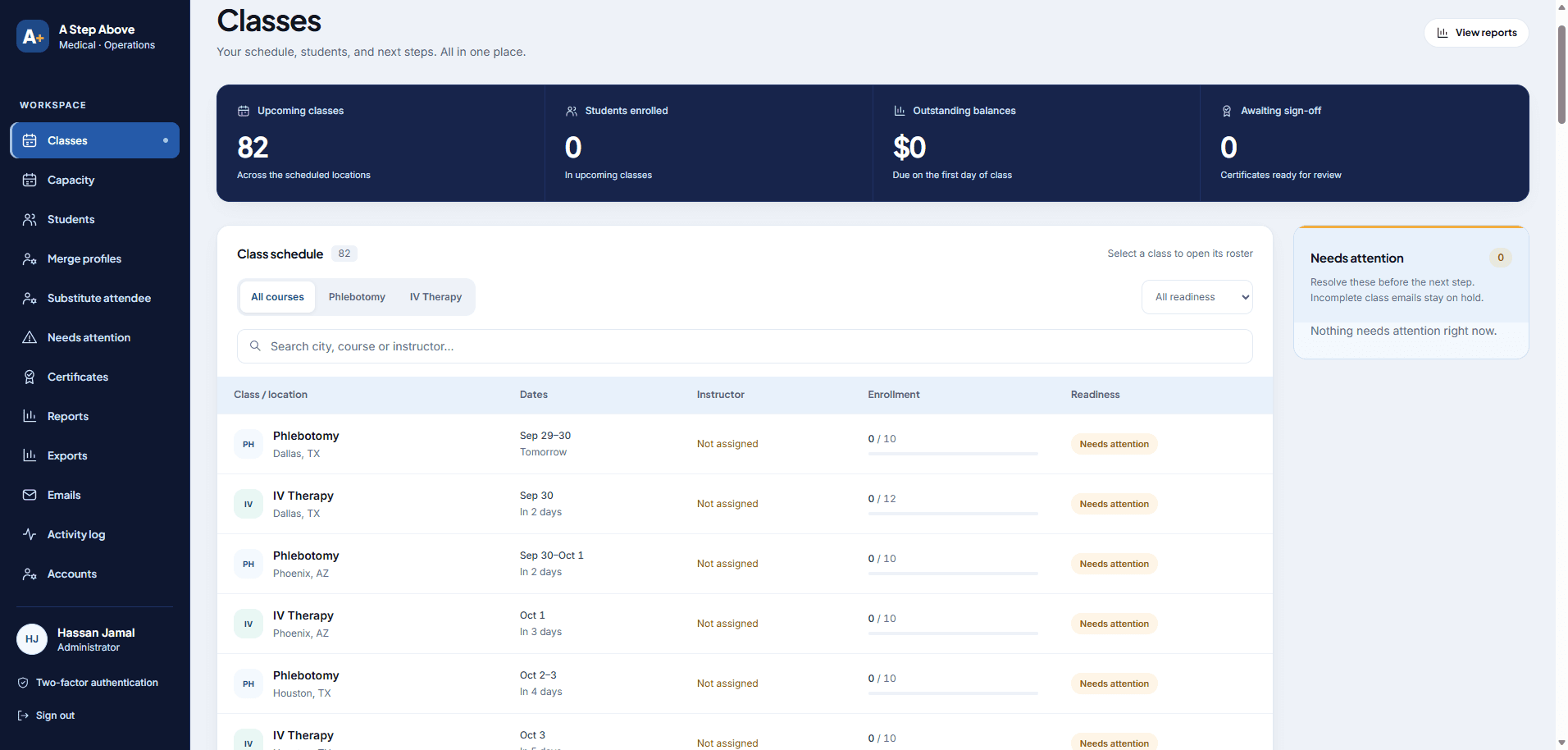
This is the backend package we build most often: the database plus a custom CRM on top, in the same build. The team runs the business from its own admin screens, the same way it edits the website in Sanity.
What do Sanity and Supabase cost?
| Plan | Price | What's included |
|---|---|---|
| Sanity Free | $0 a month | up to 20 user seats, 2 public datasets, 10,000 documents, 1 million API CDN requests and 100 GB bandwidth a month; 3 days of draft change history and 2 permission roles |
| Sanity Growth | $15 per seat a month | up to 50 user seats, 25,000 documents, private datasets and 90 days of draft change history and 5 permission roles |
| Supabase Free | $0 a month | 500 MB database, 1 GB file storage, 50,000 monthly active users, 2 active projects; free projects are paused after 1 week of inactivity and have no included automatic backups |
| Supabase Pro | from $25 a month | $10 a month of compute credits, 8 GB disk per project, 100 GB file storage, 100,000 monthly active users and daily backups kept 7 days; paid projects are not paused for inactivity |
We build on Supabase's Free plan and move the project to Pro when it goes live, so you don't pay for the database during the build. For client production apps we use Pro, because free projects pause after a week of inactivity and have no included automatic backups. Prices are from Sanity's pricing page and Supabase's pricing page. For the whole monthly bill, including hosting, see what a website costs to run each month.
Signing in isn't the same as permission
Signing someone in tells your app who they are. It doesn't decide which records they can see. In Supabase, that second job belongs to row-level security (RLS): rules on each table, such as "a customer can read only their own bookings". Every table the browser can reach needs those rules, and admin keys stay on the server, never in browser code. See Supabase's row-level security guide.
Test it before launch. Sign in as one customer and try to load another customer's record. Remove a staff member and check they lose access. Send the same payment notification twice and check you get one payment. Also agree who restores the database from a backup if something goes wrong.
Where do Vercel and GitHub fit?
Vercel hosts the website and runs its server code, but it doesn't store your business data; that's the database's job. Vercel's own runtime guidance recommends its Node.js runtime over the Edge runtime for performance and reliability. GitHub holds the code and the history of every change. At handover, you should know who owns each account (code, hosting, CMS and database) and have written steps for releasing a change.
What to ask for in a proposal
- The public pages, the content your team edits, and the private screens.
- Who can see and change each kind of record.
- Tests for publishing, permissions and failed payments or integrations.
- Separate prices for the build, moving your existing data, vendor plans and maintenance.
- Who owns the code, hosting, CMS and database accounts.
Our Sanity service covers the website and its editor. Our backend development service covers databases, portals and custom CRMs. Comparing editors instead? Read Sanity vs WordPress.
Common questions
Is Sanity an alternative to Supabase?
Do I need Supabase for a business website?
How much does Supabase cost?
Is Supabase still free in 2026?
Is Supabase safe for customer data?
Can you build a Supabase backend or CRM for my business?
Do you only build on Supabase?
Does Vercel replace a backend?
Related Articles
How Long Does a Custom Website Take? A 2026 Schedule Guide
Build a defensible schedule from inventory, content, design, integrations, review, QA and cutover instead of a universal timeline.
AI-Built Website Checklist: 8 Checks Before Launch and After Changes
Check enquiries, payments, mobile use and search access on your AI-built website. Eight practical checks, evidence to save and when to repeat them.
Can You Export Your Website? What 8 Platforms Let You Take
What Wix, Squarespace, Webflow, Shopify, WooCommerce, GoHighLevel and WordPress let you export, from their own help pages, and what to save before you cancel.
PandaCodeGen offers website and application development. Recommendations here reflect our delivery approach; the proposal for your project defines its scope. How we use evidence.